
Ness City Computer Service LLC

Home › Blog › Security
Security

How Search Results Can Land You in Trouble: Fake Ads, Fake Support Numbers and Bad Downloads

By Chris Harrison · October 8, 2026 · 6 min read

Most of us trust the first few search results. Scammers know that. They buy ads and build look-alike websites so that when you search for a support phone number, a software download or a login page, their link shows up first.

The three most common traps

1. Fake customer support numbers

You search for “printer support,” “bank phone number” or “email help.” A result promises “official” help and lists a phone number. The person who answers sounds professional, but they’re not who you think — and before long they want remote access to your computer or payment for a “repair.”

2. Bad downloads

Searching for free software, printer drivers or a PDF reader can lead to download sites that wrap the real program in an installer packed with adware, browser hijackers or worse.

3. Fake login pages

Searching “email login” or your bank’s name can surface an ad that leads to a perfect copy of the real sign-in page. Anything you type goes straight to the scammer.
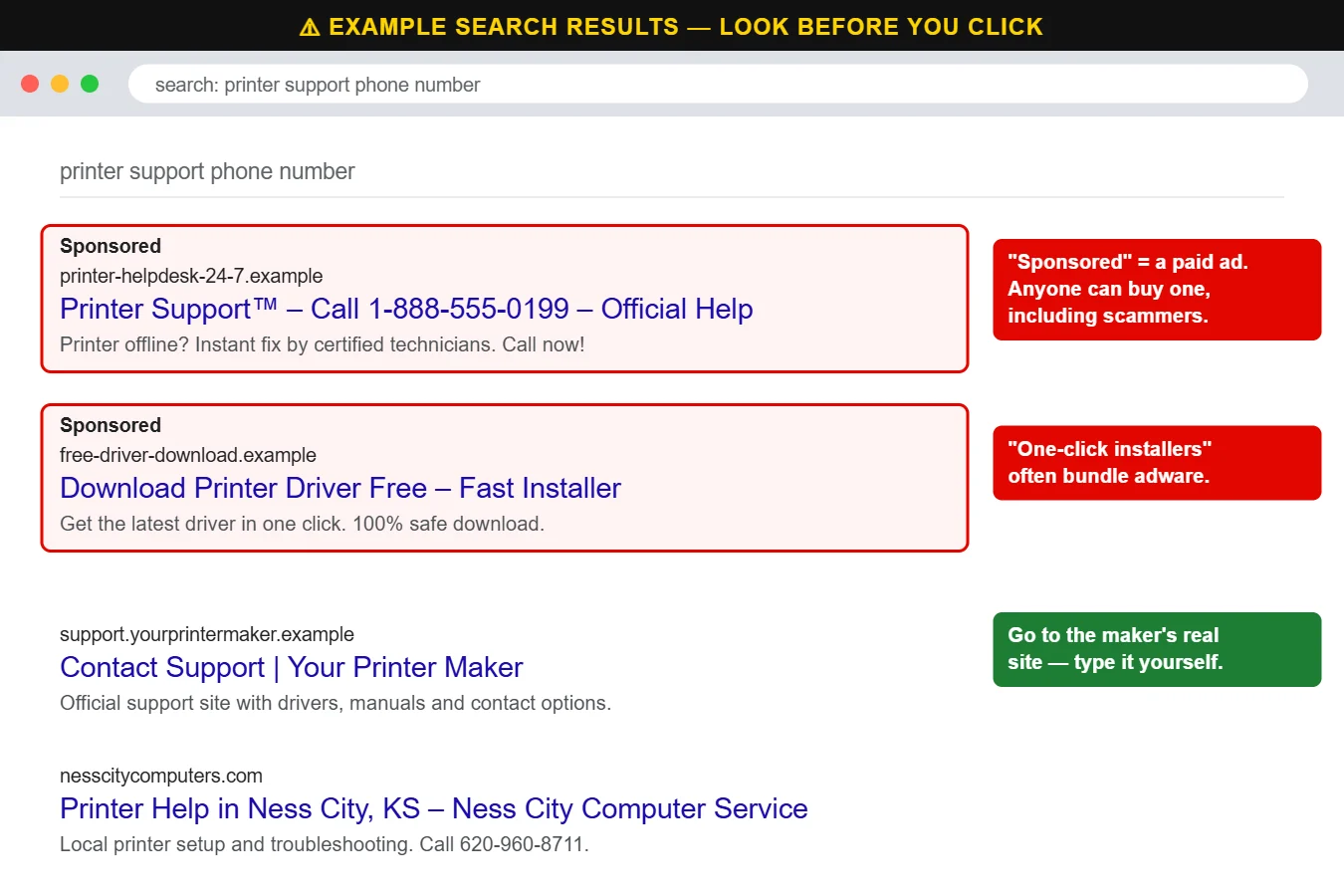
Example search results showing fake sponsored ads for support numbers and downloads
The first results aren’t always the safest. Paid ads are marked “Sponsored” — and anyone can buy one.

How to search safely

  • Notice “Sponsored.” Ads appear above regular results and look almost identical. Be extra careful with any ad offering a phone number or download.
  • Look at the web address, not the title. Titles can say anything. The address underneath tells you where you’re actually going.
  • Use bookmarks for important sites. Bookmark your bank, email and other accounts once, then use the bookmark instead of searching every time.
  • Get support numbers from the source. Use the number on your bill, the back of your card, the device itself or the company’s official app.
  • Download software only from the maker’s website or the Microsoft/Apple app store. Avoid “free download” sites and “fast installers.”
  • Be suspicious of anyone who asks for remote access after you called a number you found online.

What to do if you clicked

If you entered a password on a page you found through search, change it right away — and change it anywhere else you used the same password. If you installed something, uninstall it and run a full antivirus scan. If you gave someone remote access or payment information, disconnect from the internet, call your bank and have the computer checked.

Not sure if a site or number is legitimate? Ask us first. Call us at 620-960-8711 — a two-minute call can save hours of cleanup. Businesses can also cut down on these risks with web filtering and managed cybersecurity.

Want more free guides like this? Browse our Scam & Security Library — real examples of phishing emails, scam texts, fake pop-ups and more.

Chris Harrison, owner of Ness City Computer Service
About the author
Chris Harrison

Chris owns Ness City Computer Service and has more than 30 years of IT experience helping Kansas homes and businesses keep their technology running and secure.

Have a question about your tech?

Call the local guys. We’re happy to help — no pressure.

Services

How we can help

Computer repair & PC sales

Managed IT services

Cybersecurity

Networking & Wi-Fi

Backup & disaster recovery

VoIP business phones

Surveillance & alarms

Web design & hosting

Scroll to Top
