
Ness City Computer Service LLC

Home › Blog › Security
Security

Public Wi-Fi Safety: Look-Alike Networks and What Not to Do on Hotel and Café Wi-Fi

By Chris Harrison · October 8, 2026 · 4 min read

Free Wi-Fi at the café, hotel, airport or ballpark is handy. Most of the time it’s fine — especially now that almost all websites use encryption. But public networks come with a few risks worth knowing about, particularly for business owners checking email and banking on the road.
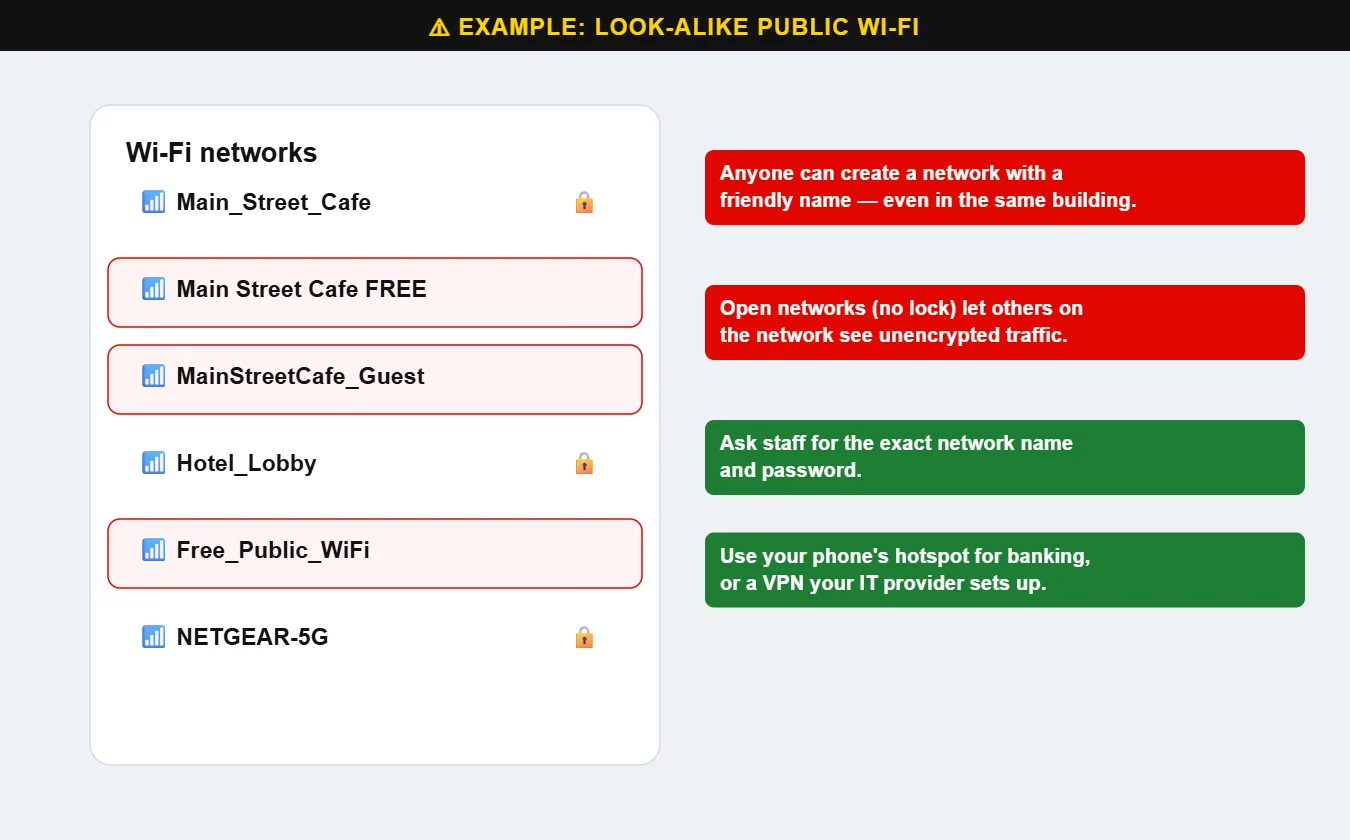
Example of look-alike public Wi-Fi network names
Which one is the real network? Anyone can create a hotspot with a friendly-sounding name.

The main risks

  • Look-alike networks. Anyone can set up a hotspot named “Main Street Cafe FREE.” If you connect to it, they can watch your traffic and redirect you to fake sign-in pages.
  • Open networks (no password, no lock icon) don’t encrypt the connection between your device and the router.
  • Captive portals that ask too much. A Wi-Fi sign-in page that asks for your email password or card number is a red flag.
  • Auto-connect. Phones and laptops may silently join networks with familiar names.

Tips for safer public Wi-Fi

  • Ask staff for the exact network name and password.
  • Use your phone’s hotspot for banking, payroll and anything sensitive.
  • Look for the lock icon / https in the address bar, and don’t click through certificate warnings.
  • Turn off auto-join for public networks and “forget” them when you leave.
  • Use a VPN for business work on the road. We can set one up that connects back to your office.
  • Keep your device updated and its firewall turned on.

What about public charging stations?

USB charging ports in airports and hotels could, in theory, be tampered with to access data. Real-world cases are rare, but the fix is easy: use your own charger in a wall outlet, carry a battery pack, or use a charge-only cable. If your phone asks whether to “trust this device” when you plug in to charge, tap Don’t Allow.

Want a secure setup for working on the road? Call us at 620-960-8711 — and see our networking services for the office side.

Want more free guides like this? Browse our Scam & Security Library — real examples of phishing emails, scam texts, fake pop-ups and more.

Chris Harrison, owner of Ness City Computer Service
About the author
Chris Harrison

Chris owns Ness City Computer Service and has more than 30 years of IT experience helping Kansas homes and businesses keep their technology running and secure.

Have a question about your tech?

Call the local guys. We’re happy to help — no pressure.

Services

How we can help

Computer repair & PC sales

Managed IT services

Cybersecurity

Networking & Wi-Fi

Backup & disaster recovery

VoIP business phones

Surveillance & alarms

Web design & hosting

Scroll to Top
