
Ness City Computer Service LLC

Home › Blog › Security
Security

Tax Season Scams: Fake IRS Texts, Refund Emails and Threatening Calls

By Chris Harrison · October 8, 2026 · 4 min read

Every tax season brings a wave of scams pretending to be the IRS or a state revenue department. Some promise a refund if you’ll just “verify your identity.” Others threaten arrest if you don’t pay a debt today.
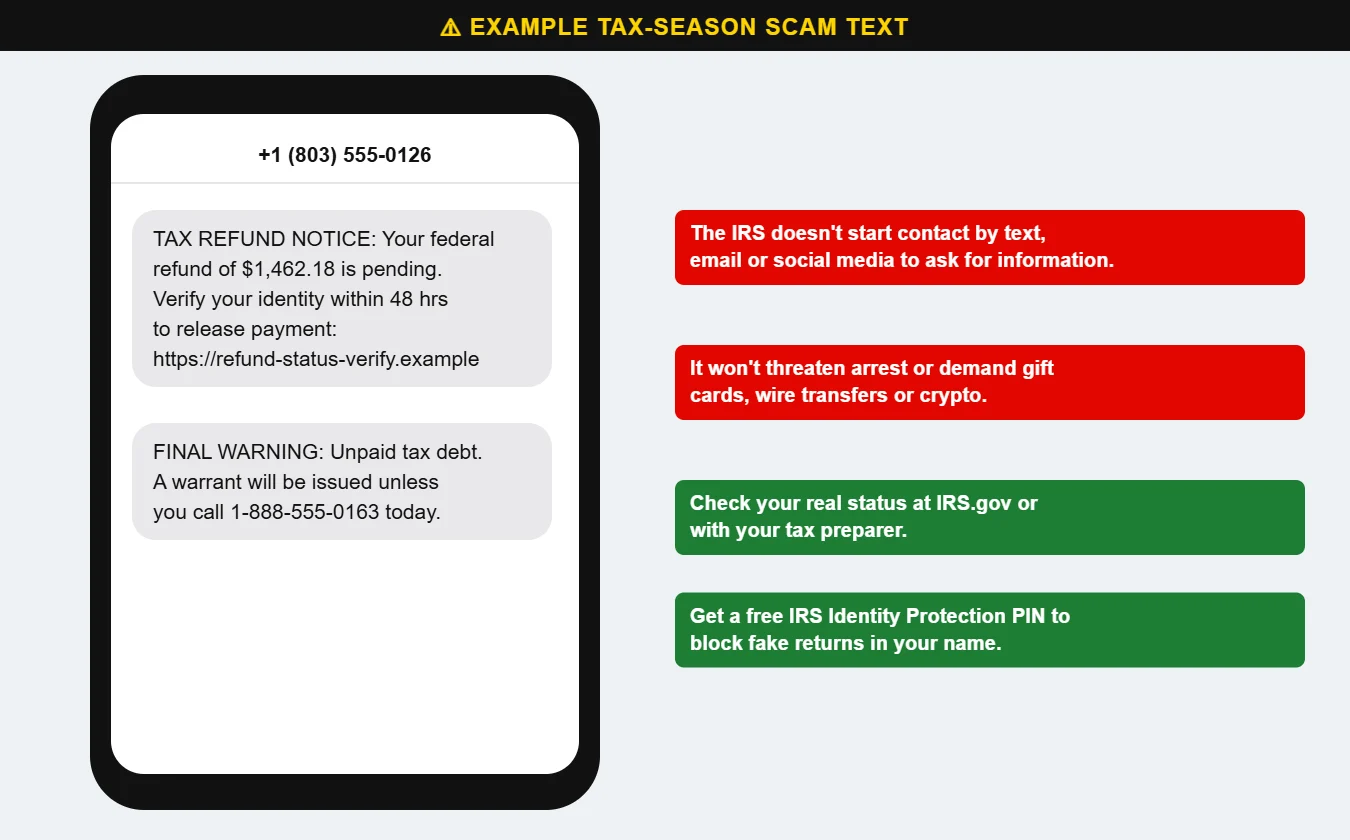
Example of fake tax refund and IRS scam texts
Fake tax texts either dangle a refund or threaten arrest — both want your information or your money.

How the IRS really contacts you

  • The IRS generally makes first contact by mail.
  • It does not start contact by text message, email or social media to request personal or financial information.
  • It will not threaten to have you arrested or deported for not paying immediately.
  • It will not demand payment by gift card, wire transfer or cryptocurrency.

Common tax scams

  • Refund texts and emails with a link to “verify” or “claim” a refund — the link steals your information.
  • Threatening phone calls about back taxes, often with a fake badge number and caller ID that looks official.
  • Fake tax preparers who promise huge refunds, charge a percentage of your refund or won’t sign the return.
  • Business W-2 requests: an email that appears to come from the owner asking payroll to send all employee W-2 forms. Always verify in person.
  • Fake tax credits promoted on social media that encourage you to file for credits you don’t qualify for.

Protect yourself

  • Check your tax account and refund status directly at IRS.gov or with your tax preparer.
  • Get a free Identity Protection PIN (IP PIN) from the IRS. It’s a six-digit number that prevents someone else from filing a return using your Social Security number.
  • File early — scammers can’t file in your name once your return has been accepted.
  • Don’t click links or call numbers in unexpected tax messages.

For businesses, protect payroll and W-2 data with email security and staff awareness — part of our managed cybersecurity. Questions? Call us at 620-960-8711.

Want more free guides like this? Browse our Scam & Security Library — real examples of phishing emails, scam texts, fake pop-ups and more.

Chris Harrison, owner of Ness City Computer Service
About the author
Chris Harrison

Chris owns Ness City Computer Service and has more than 30 years of IT experience helping Kansas homes and businesses keep their technology running and secure.

Have a question about your tech?

Call the local guys. We’re happy to help — no pressure.

Services

How we can help

Computer repair & PC sales

Managed IT services

Cybersecurity

Networking & Wi-Fi

Backup & disaster recovery

VoIP business phones

Surveillance & alarms

Web design & hosting

Scroll to Top
